Compose HotSwan Blog
Desktop Hot Reload for Compose Multiplatform: One Save Updates Your Android Device and Desktop Window Together

July 25, 2026 · 9 min read
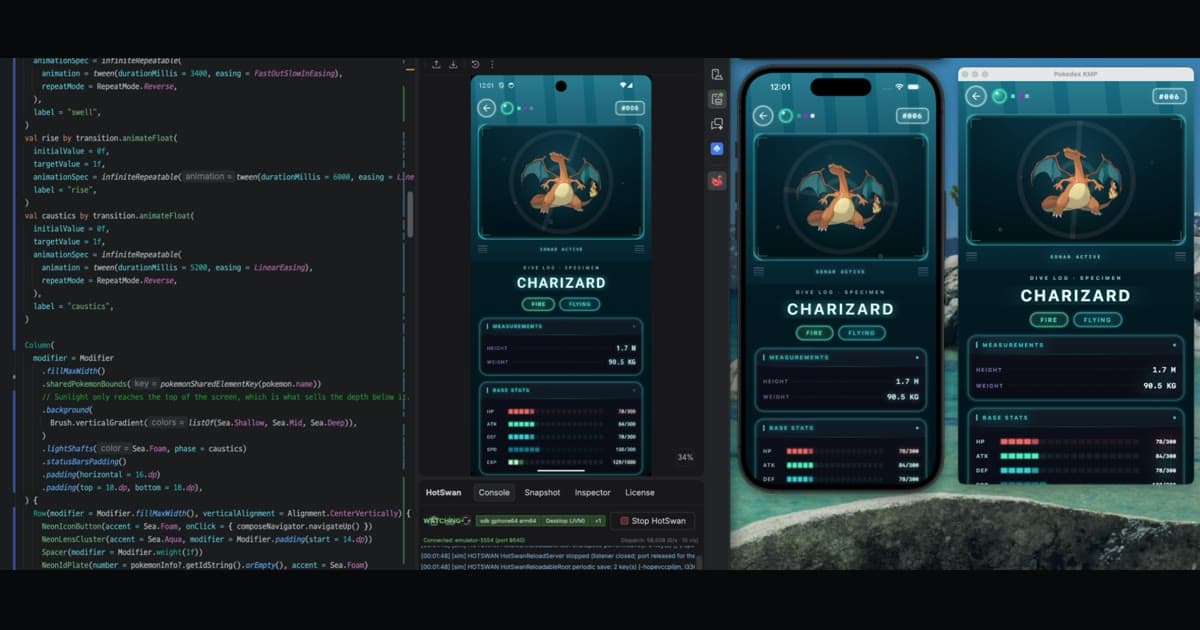
One edit in a shared module, applied to a running Android emulator and a running Compose Desktop window at the same time.
Kotlin Multiplatform lets you write one Compose UI and ship it to a phone and a desktop. Your feedback loop, though, has never been shared the way your code is. You change a shared composable, then you rebuild for one target, look at it, and rebuild for the other to find out whether the spacing you just fixed still works in a resizable window. Compose HotSwan 2.0.0-beta04 closes that gap: Compose Desktop targets now hot reload through the same engine that drives Android, and a single save can update a running device and a running desktop window at the same time.
In this article, you'll explore what simultaneous reload looks like on a real Kotlin Multiplatform app, how an AI agent can drive that loop across both targets at once, how one engine ended up running on two very different runtimes, why your scroll position and navigation stack survive the swap, and how to add a desktop target to your own project.
One save, two targets
The clip above is the KotlinConf app, running twice from one project. On the left is the editor, in the middle an Android emulator, on the right a Compose Desktop window. Both are showing the same schedule screen, built from the same shared module.
The first edit is a color inside a gradient. Both screens repaint, and the tool window reports it as one line: patched on Android, patched on Desktop. The second edit is structural. A new composable wraps every session card, which adds nodes to the layout rather than changing a value in one. That one runs as a single Gradle invocation with one reload task per target, lands about a dozen classes on each side, and neither app restarts. The schedule stays scrolled where it was.
Nothing about the workflow changes to get this. The desktop app shows up in the same device list as your emulators and phones. You select the targets you want, and every save after that goes to them from a single build. One thing to know while you are picking: the Android leg reloads one device, so the shape that works is one Android target alongside Desktop rather than two phones. The multi device page has the details. Select only the desktop entry and no adb command runs at all, which matters if you are working on a desktop only feature with no device plugged in.
The reason this is worth more than two separate reloads is that multiplatform bugs live in the gap between targets. A layout that wraps at 400dp and a layout that has 1400 pixels of width disagree in ways you only notice by looking at both. Seeing the same edit land on a phone and a window in the same second turns that from a build cycle into a glance.
An agent in the loop, on both targets
Once a reload can carry structural change, the developer stops being the only thing that can drive it. In the next clip, an AI agent has the editor. It is not tuning a padding value. It rewrites how the schedule screen is organized, adds selection and scroll behavior that did not exist, and then takes the entire screen through a visual redesign, from the dark theme to a light one with new decoration.
Watch the two running apps rather than the code. Every time the agent finishes a file, the emulator and the desktop window move to the new design together, while the app keeps running. The agent never rebuilds, never reinstalls, and never waits for a launch. It writes, and the result is on both screens in about a second.
This is the part of the loop that changes what an agent is useful for. An agent that has to wait 40 seconds to see the effect of a change cannot iterate on a design, it can only guess and hand the result to you. An agent that sees its own output on two running apps in a second can try something, look at what happened through the HotSwan MCP server, and correct itself before it ever asks for your review.
One engine, two runtimes
Desktop support did not come from writing a second hot reload. It came from the shape v2 already had.
HotSwan v2 does not ask the virtual machine to redefine your classes. That approach, which v1 used on Android through JVMTI, is limited by what the runtime is willing to swap: change a method body and it works, change the shape of a class and it refuses. v2 takes a different route. Your edit is compiled by the normal Kotlin compiler, the classes that changed are delivered to the app while it runs, and an interpreter inside the app executes the new code for the functions you touched. Compose then recomposes the affected scopes in place. The virtual machine is never asked to change its mind about a class it already loaded, which is why the range of edits reaches all the way to new composables and new structure.
The consequence for multiplatform is the interesting part. An engine built that way needs almost nothing from Android to run your code, because executing Kotlin bytecode is the same problem on a phone and on a laptop. What it did need from Android was a short list of services around the edges:
- Somewhere to read the original code from, so it knows what your app looked like before the edit.
- A way to reach the thread that owns the composition, because Compose state can only be touched from there.
- A channel the IDE can push through to reach the running app.
- Somewhere to log, so you can see what a reload did.
Each of those became a seam with two implementations. On Android, the original code comes out of the packaged app, the composition thread is the main looper, and the IDE reaches the device through adb. On desktop, the original code ships as ordinary resources on the classpath, the composition thread is the AWT event dispatch thread that Compose Desktop already runs on, and the IDE connects straight to a local socket the app opens for itself. No adb, no device, no forwarding.
Everything between those seams, the part that reads bytecode, executes it, and decides which composables have to recompose, is the same code on both targets. It now ships as its own artifact so the Android runtime and the desktop runtime can each build on it, and if you consume HotSwan on Android you get it without changing anything in your build file.
Two legs, one invocation
Running both at once is not two reloads that happen to overlap. When you save, the IDE resolves which targets you selected, works out the right reload task for each one, and runs them in a single Gradle invocation. Android and desktop reach different apps over different channels, so each one is a separate leg with its own result.
Keeping those legs honest turned out to matter more than making them fast. A reload that quietly does nothing is worse than one that fails, because you spend the next ten minutes debugging code that never reached the app. So a leg that applies nothing says so, a leg that fails does not stop the other from finishing, and a reload is only reported as done when the app actually took it. If you select your desktop app and then close it, the next save tells you the desktop leg was skipped because nothing is running there, and reloads your device anyway.
The two servers also stay out of each other's way. The desktop app listens on its own port rather than the one Android forwards through, so a device and a desktop window can be connected at the same time without either push landing in the wrong process.
Why your state survives the swap
A reload that resets your app to the first screen is a slow rebuild with extra steps. The value of hot reload is that you stay where you were, and on a screen seven taps deep that is most of the value.
Compose keeps what your composables remember in a slot table, positioned by where each call sits in the composition. Replacing the code behind those calls risks losing the connection between a slot and the value that belongs in it. HotSwan handles that by keeping track of what the running composition remembered before the swap and restoring it afterward, so a remembered scroll state comes back as a scroll state rather than as a fresh default. When an edit changes a screen enough that a recorded value no longer fits its slot, that value is left out instead of forced back in, and the composable re-runs its initializer. The visible result is the same as navigating away and coming back to that screen, which is a much better outcome than a wrong value in a slot.
This mechanism is not Android specific either, so a desktop reload keeps its scroll position and its navigation for the same reason a device does. In the first clip, the schedule list stays exactly where it was scrolled through both edits, on both targets.
Setting up a desktop target
This section assumes HotSwan is already installed in your project. If it is not, the v2 beta post walks through the IDE plugin and the Gradle plugin from start to finish, and everything below is the same on top of it.
Desktop then takes two more steps. The first is applying the compiler plugin to the module that holds your shared Compose code, the same module that declares your targets. If it already has HotSwan applied for Android, adding a JVM target is all it takes for the desktop side to be instrumented as well.
1plugins {
2  alias(libs.plugins.hotswan.compiler)
3}
4
5kotlin {
6  androidTarget()
7  jvm()
8}
The second is optional, and it is telling your desktop application to start the reload runtime at launch instead of leaving it to start itself. You do not add the runtime to the shared module: the plugin already puts it on that module's JVM runtime classpath for you. What the plugin cannot do is make it visible to the module that calls the bootstrap, because a runtime dependency is not exposed to whoever depends on that module at compile time. So the desktop application module declares it once, only so main() can compile the call:
1dependencies {
2  implementation(projects.shared)
3  implementation(compose.desktop.currentOs)
4  implementation("com.github.skydoves.compose.hotswan:interpreter-runtime-core:2.0.0-beta04")
5}
Then call the bootstrap early in main(), before your window opens:
1fun main() {
2  installInterpreterBaselineDesktop()
3
4  application {
5    Window(onCloseRequest = ::exitApplication) {
6      App()
7    }
8  }
9}
None of this is required. The runtime self bootstraps the first time instrumented code runs, so a desktop app becomes reloadable with the plugin alone, and something that touches instrumented code before your bootstrap call, a dependency injection graph built into a top level property for example, no longer brings the app down. What the explicit call buys you is the timing: it starts the runtime at a point you chose rather than at the first composition, so the desktop target appears in the list immediately. It is install if absent, so adding it to an app that has already started on its own does nothing.
From there, run your desktop app the way you normally do, start HotSwan from the tool window, and pick your targets from the device list. Desktop is opt in, so it never gets selected for you. Full instructions, including the multi module cases, are in the Kotlin Multiplatform documentation.
Try it
In this article, you've explored simultaneous hot reload across Android and Compose Desktop, what it looks like when an AI agent drives that loop, how one interpreter ended up serving two runtimes through a small set of platform seams, how a single save turns into two independently reported reload legs, and what keeps your on screen state alive across a structural edit.
Understanding that the engine executes your new code rather than asking the virtual machine to redefine classes explains where the boundaries sit. It is why adding a composable or reshaping a layout reloads, why an edit that changes what a remembered slot holds falls back to a fresh initializer instead of a wrong value, and why the desktop target behaves the same way as a device rather than being a reduced version of it.
Whether you are building a Compose Multiplatform app that has to look right in a resizable window and on a phone, keeping a design system honest across both, or letting an agent iterate on a screen while you watch, this is the loop 2.0.0-beta04 is built for. If you are starting from nothing, the v2 beta post has the full install walkthrough, then add the two desktop steps above, point it at a shared screen you have been meaning to redesign, and open both apps side by side. If something does not reload the way you expect, a short clip and a small repro on the issue tracker is the fastest path to a fix.
As always, happy coding!
— Jaewoong (skydoves)