Documentation
Kotlin Multiplatform (KMP)
One save, every target you are running. HotSwan reloads Compose Multiplatform on Android, the iOS simulator, and Compose Desktop, from the same edit to the same shared code.
That is one detail screen being redesigned on an Android device and an iOS simulator at the same moment, from one file. Multiplatform bugs live in the gap between targets, and the gap is much harder to miss when both targets are in front of you.
Overview
The three legs share one engine. What differs is how compiled code reaches a running app, since a JVM and a Kotlin/Native binary do not accept it the same way. Everything after delivery, deciding what recomposes and keeping your state, is the same on all three.
| Target | What it needs | Apply the plugin to |
|---|---|---|
| Android | A debug build on a device or emulator, API 28+ | Your Android application module |
| iOS simulator | Apple Silicon, Xcode with a simulator runtime, Compose Multiplatform 1.11.0 | The module that declares binaries.framework |
| Desktop (JVM) | Your Compose Desktop app, running | Nothing extra, it comes with the shared module |
You do not have to set all three up. Each leg works on its own, and a target you are not running is simply not reloaded.
Where to apply the plugin
This is the one decision worth getting right, and it has a simple rule: apply the plugin to the module that owns the app. From there it propagates to the Compose libraries that module depends on, so a shared UI module does not need its own apply.
In a typical KMP project that means two applies. The Android application module owns the Android app. The module that declares binaries.framework, usually called shared, owns the iOS app, because that framework is what Xcode links. Desktop needs no apply of its own, since it is a target of the shared module you already covered.
[plugins]
hotswan-compiler = { id = "com.github.skydoves.compose.hotswan.compiler", version = "2.0.2" }
Register it once in the root build script without applying it, then apply it in the two modules above:
alias(libs.plugins.hotswan.compiler) apply falseAndroid
Apply the plugin to your Android application module. The runtime is added for you on debug variants, and there is nothing to declare by hand.
// app/androidApp/build.gradle.kts
plugins {
    alias(libs.plugins.androidApplication)
    alias(libs.plugins.composeMultiplatform)
    alias(libs.plugins.composeCompiler)
    alias(libs.plugins.hotswan.compiler)
}
Then tell HotSwan which module that is. Open Settings → Tools → Compose HotSwan and set the Gradle module path to your Android application module.
This matters more in a KMP project than in a single module Android one, because the module is usually nested. A project that keeps its Android app in app/androidApp needs :app:androidApp, not :androidApp. Getting this wrong is the most common reason a KMP setup reports that it cannot find the module.
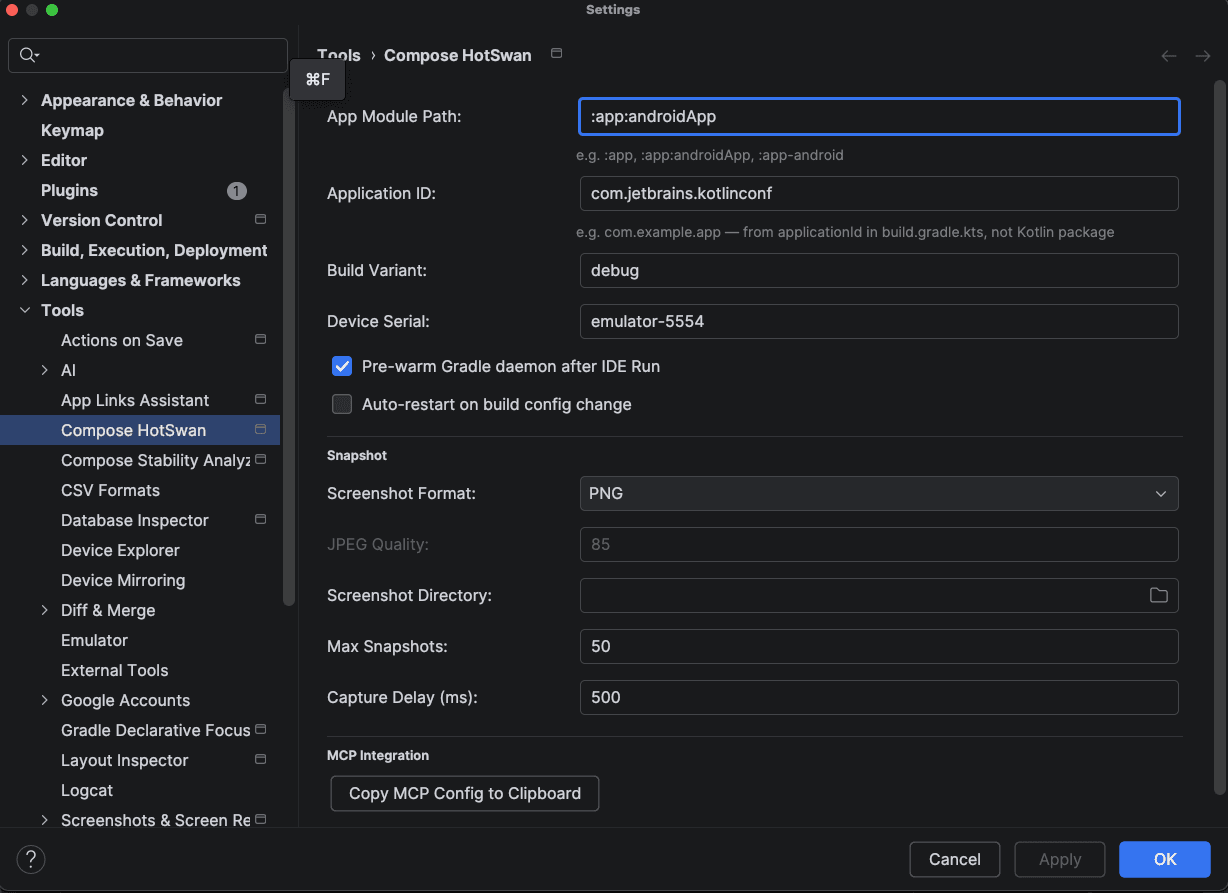
Build and run the app as usual, then open the HotSwan tool window, select your device, and press Start. Edits to shared Compose code land on the running app from that point on.
Android carries the widest range of edits, because the interpreter runs there with the least indirection. The clip below replaces a whole detail screen, background field and all, on a running app.
iOS simulator
Apply the plugin to the module that declares your iOS framework. That is the whole setup: no Swift line, no extra dependency, no manual export. The plugin exports the iOS runtime on your framework and registers the reload task itself.
// app/shared/build.gradle.kts
plugins {
    alias(libs.plugins.kotlinMultiplatform)
    alias(libs.plugins.composeMultiplatform)
    alias(libs.plugins.composeCompiler)
    alias(libs.plugins.hotswan.compiler)
}

kotlin {
    listOf(iosArm64(), iosSimulatorArm64()).forEach {
        it.binaries.framework {
            baseName = "shared"
            isStatic = true
            // No manual export. HotSwan attaches its iOS runtime to this framework.
        }
    }
}
Two project level details matter. Your Compose entry point has to be a top level, zero argument function returning a UIViewController, which is the shape HotSwan can host. An entry that takes arguments supplied from Swift is refused by name rather than reloaded incorrectly. And your Info.plist needs CADisableMinimumFrameDurationOnPhone set to true, which is a standard Compose Multiplatform on iOS key.
Run the app on a booted simulator, then select it in the HotSwan device list. It appears as iossim:<UDID> beside your adb devices. The clip below is a color being dragged in the IDE picker, with the gradient following it on the simulator.
That is the fast path: a literal edit skips compilation entirely and lands in about 5 milliseconds, which is what makes dragging a color picker feel connected to the device. Structural edits on iOS take longer than on Android, because the change ships as a small dynamic image the running app loads. See Requirements for the supported Xcode and Kotlin versions.
Desktop (JVM)
Desktop needs no apply of its own. Your shared module already has the plugin, and its JVM target is instrumented along with the others. Run your desktop app and it shows up as a target you can select next to your devices.
The runtime self bootstraps the first time instrumented code runs, so a desktop app becomes reloadable without a line of extra code. Calling the bootstrap explicitly is still worth it, because it binds the reload port at launch rather than at the first composition, which makes the target appear immediately:
// app/desktopApp/src/jvmMain/kotlin/Main.kt
fun main() {
    installInterpreterBaselineDesktop()
    application {
        Window(onCloseRequest = ::exitApplication) { App() }
    }
}
For that call to resolve at compile time, add the runtime to your desktop module:
// app/desktopApp/build.gradle.kts
dependencies {
    implementation("com.github.skydoves.compose.hotswan:interpreter-runtime-core:2.0.2")
}
The clip below takes the same schedule screen through a full theme change on the desktop window, dark to light, while the app keeps running.
If the desktop window never appears in the target list, the reload port is usually held by a previous run of the same app that is still alive. See Troubleshooting.
Setup Example: KotlinConf App
The KotlinConf App is an open source KMP project by JetBrains with Android, iOS, Desktop, and Web targets. It is the project in the clips on this page, so here is exactly how HotSwan is wired into it.
1. Add the plugin to the version catalog
[plugins]
hotswan-compiler = { id = "com.github.skydoves.compose.hotswan.compiler", version = "2.0.2" }
2. Register in the root build script
alias(libs.plugins.hotswan.compiler) apply false3. Apply it in the two modules that own an app
This project keeps its UI in app/shared, its Android app in app/androidApp, and its desktop app in app/desktopApp. The plugin goes in the first two. app/shared is not just the UI module here, it is the module that declares binaries.framework, which is what makes it the owner of the iOS app.
// app/androidApp/build.gradle.kts
plugins {
    alias(libs.plugins.composeMultiplatform)
    alias(libs.plugins.composeCompiler)
    alias(libs.plugins.hotswan.compiler)
}

// app/shared/build.gradle.kts
plugins {
    alias(libs.plugins.kotlinMultiplatform)
    alias(libs.plugins.composeMultiplatform)
    alias(libs.plugins.composeCompiler)
    alias(libs.plugins.hotswan.compiler)
}
app/desktopApp gets no plugin. It only declares the runtime dependency so its main() can call the bootstrap, and the instrumentation it runs comes from app/shared's JVM target.
4. Point HotSwan at the Android module
For this project the Gradle module path is :app:androidApp, since the Android module is nested under app/. Set it in Settings → Tools → Compose HotSwan, as shown in the Android section above.
5. Run whichever targets you want, and save
Launch the Android app, the iOS simulator app, the desktop app, or all three. Select them in the HotSwan tool window and press Start. An edit in app/shared now reaches every target you selected, from one save.