Documentation
Multi-Target Hot Reloading
Edit once, see the change on every target. A Compose Multiplatform bug usually lives in the gap between platforms, and the slow part of finding it is doing the same loop three times: switch target, rebuild, reinstall, navigate back to the screen you were on. HotSwan removes that loop. Save a file and the change reaches your Android device, your Compose Desktop window and every booted iOS simulator from the same build, with no extra configuration.
Overview
HotSwan compiles your change once and applies it to every target you have selected, from one build. The three targets are an Android device or emulator, a Compose Desktop window, and booted iOS simulators. Adding a target does not add a build.
One detail worth knowing up front, because it decides how you set up your targets: the Android leg reloads one device at a time. Compose Desktop is a single window by nature, while the iOS leg does reload several booted simulators together. So the shape that works is one Android device plus Desktop plus as many simulators as you have booted.
This is especially useful for:
- Catching the gap between platforms: A shared composable that looks right on Android and wrong on iOS is the bug Compose Multiplatform is actually prone to. Seeing both react to the same save is how you notice.
- Designing against the real thing: Tune spacing, color and typography with a phone, a desktop window and a simulator all live in front of you.
- Screen size comparison: Compare compact, medium and expanded window size classes without switching targets.
- Demo preparation: Iterate on UI changes while every demo target is already connected and running.
Selecting Devices
Click the device chip in the HotSwan toolbar to open the target selector. Check the targets you want and close the popup. Selected targets appear as chips in the toolbar.
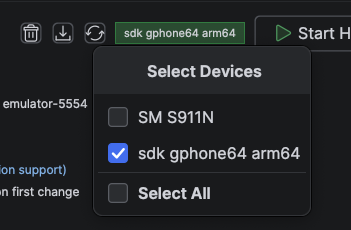
Attached Android devices and booted iOS simulators are listed here. The Compose Desktop target is not listed: it is offered separately while a desktop app is reachable.
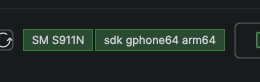
Selected targets appear as chips in the toolbar. Pick one Android device, since the Android leg reloads a single device, and add Desktop and as many booted simulators as you want alongside it.
If you never open the selector, HotSwan picks up what is attached on its own, so a single-device project needs no setup at all. Reach for the selector when more than one target is available and you want to say which.
How It Works
One save, three stages:
Compile Once
HotSwan compiles the changed file and extracts what actually changed. This happens once, no matter how many targets are selected.
Deliver to Each Leg
One build drives every selected leg: Android, Compose Desktop and the iOS simulators, which are handed over together. A leg that is slow or unreachable does not hold up the others.
Apply In Place
Each target applies the change to the app that is already running and recomposes. Nothing restarts, and navigation and state survive on every target.
Error Handling
Each leg is reported on its own. One leg failing does not hide what the others did, and it does not stop them.
- Per leg, not per device: Results are reported for each leg, so a reload can tell you that Android applied and the iOS leg failed, with the reason, rather than only showing you its green half.
- A leg that is not there: If a target is not running, that leg says so by name. It is never reported as a silent success.
- An incompatible change: Some changes cannot be applied in place, such as altering a class's supertype. HotSwan detects that while building and restarts the app for you. See Supported Changes.
Tips
- Every target must be running the same debug build of your app. If one is running something older, reinstall it before you start a session.
- The Android leg reloads one device. Selecting a second Android device does not reload it, so pick the one you want to watch.
- USB and wireless Android devices behave the same way, and can be mixed with simulators freely.
- Snapshots capture from the Android device, so a session without one records no snapshot. See Snapshot.
- For how to apply HotSwan in a Compose Multiplatform project, and which module to apply it to, see Kotlin Multiplatform.